Product updates
All booked up? Capacity and Workload come to AYON Planner

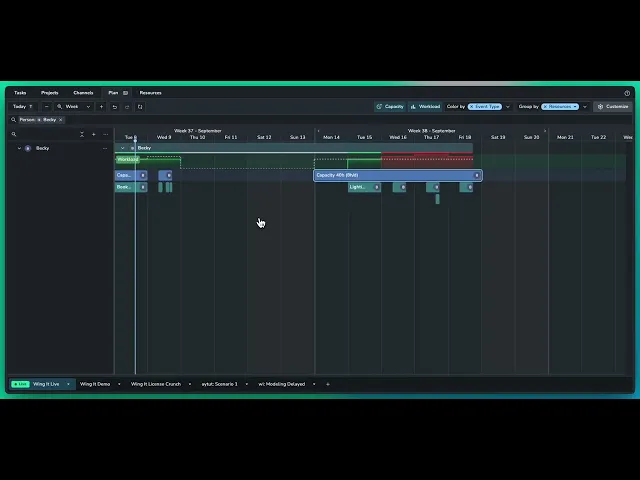
AYON Planner can now show not just what someone is booked to do, but whether they actually have the time to do it. New Capacity and Workload features make it easier to balance teams, spot overbooking and plan around real availability.
A production schedule can tell you who’s booked, what they’re working on and when the work is meant to happen. But there’s another question production teams need to answer every day: does that person actually have enough time available to do it?
Until now, Planner could show that an artist was booked onto a task or production phase, but the availability behind that booking still had to be understood elsewhere. An eight-hour booking looks perfectly reasonable on a timeline until you remember the artist is only working a half day. A freelancer might be available for one afternoon rather than the whole week. Someone could have several apparently sensible bookings that add up to ten hours of work in an eight-hour day.
With Planner, AYON can now account for that difference.
New Capacity and Workload features let production teams define how much time a person has available, compare it with the work they’ve been booked to do, and spot problems directly on the timeline before they get buried in the schedule.
Bookings only tell half the story
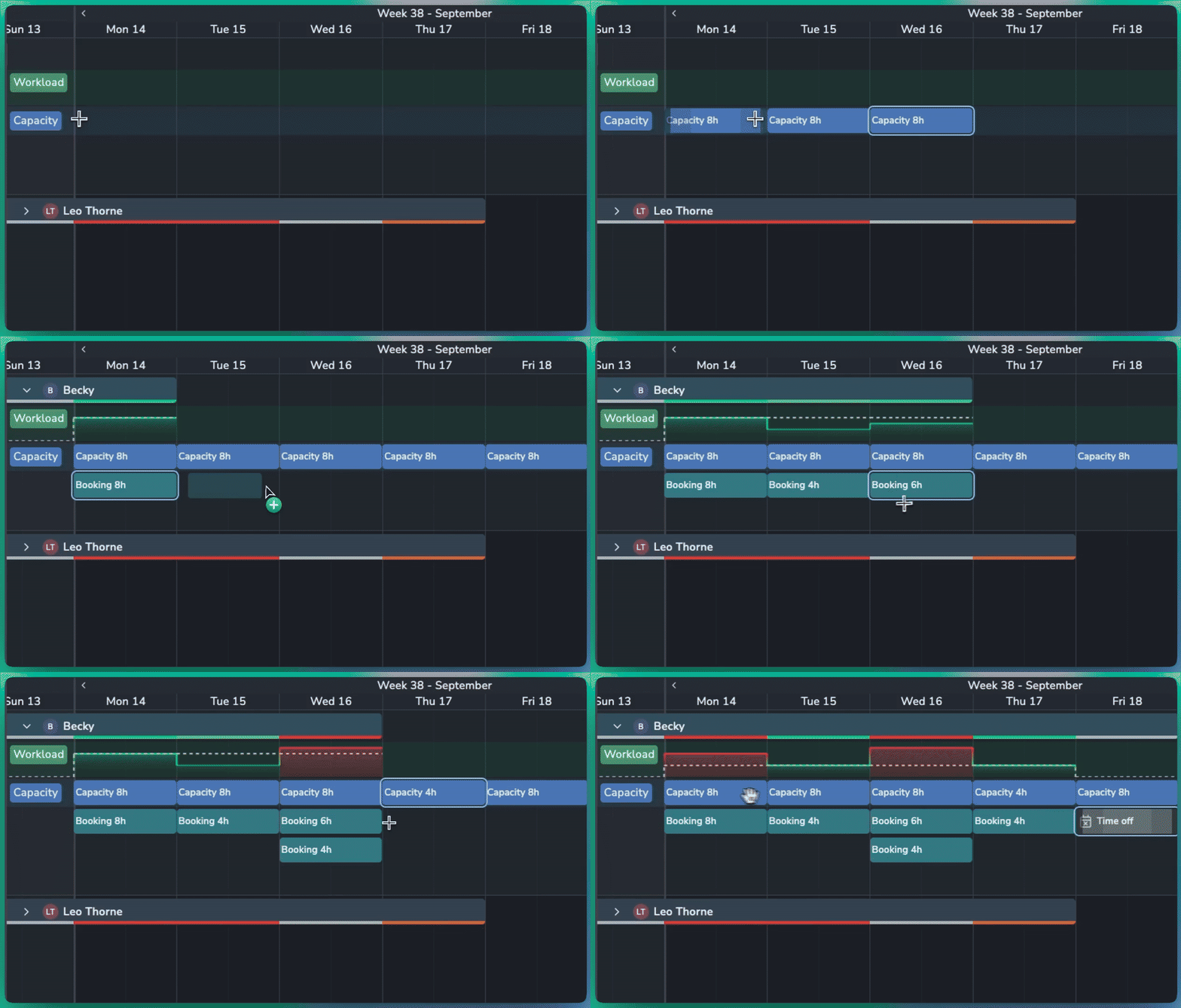
Capacity represents the time someone is actually available to work.
For a full-time artist, that might be eight hours each day. Someone working a half day can have four hours. A freelancer could be available for an afternoon on Tuesday and a morning on Wednesday. Capacity can be created for individual days, specific hours, or across longer periods.
If someone is available for eight hours per day across a five-day week, you don’t need to create five separate entries. Set the capacity to eight hours per day and Planner calculates the 40-hour total across the period.
Bookings can now be treated with the same flexibility. A task that spans two days doesn’t have to represent two full days of work. If it needs eight hours in total, you can book eight hours across those two days and Planner treats it as four hours per day.
That distinction sounds small, but it changes what the schedule can tell you. A block on a timeline no longer has to mean someone is occupied for every available hour between its start and end dates.
Know when the plan starts to wobble
Once capacity has been defined, the new Workload view compares it with the work booked against that person.
The workload graph shows capacity as a dotted line and builds up the person’s bookings against it. If an artist has eight hours available and seven hours booked, production can see that there’s still an hour available. Add another two-hour meeting and the schedule moves beyond their available capacity.
Planner makes those conditions visible through colour. Available capacity starts muted, becoming brighter green as bookings approach the available time. A bright green workload means capacity and bookings match. Move slightly beyond capacity and the workload turns orange. Push significantly further and it turns red.
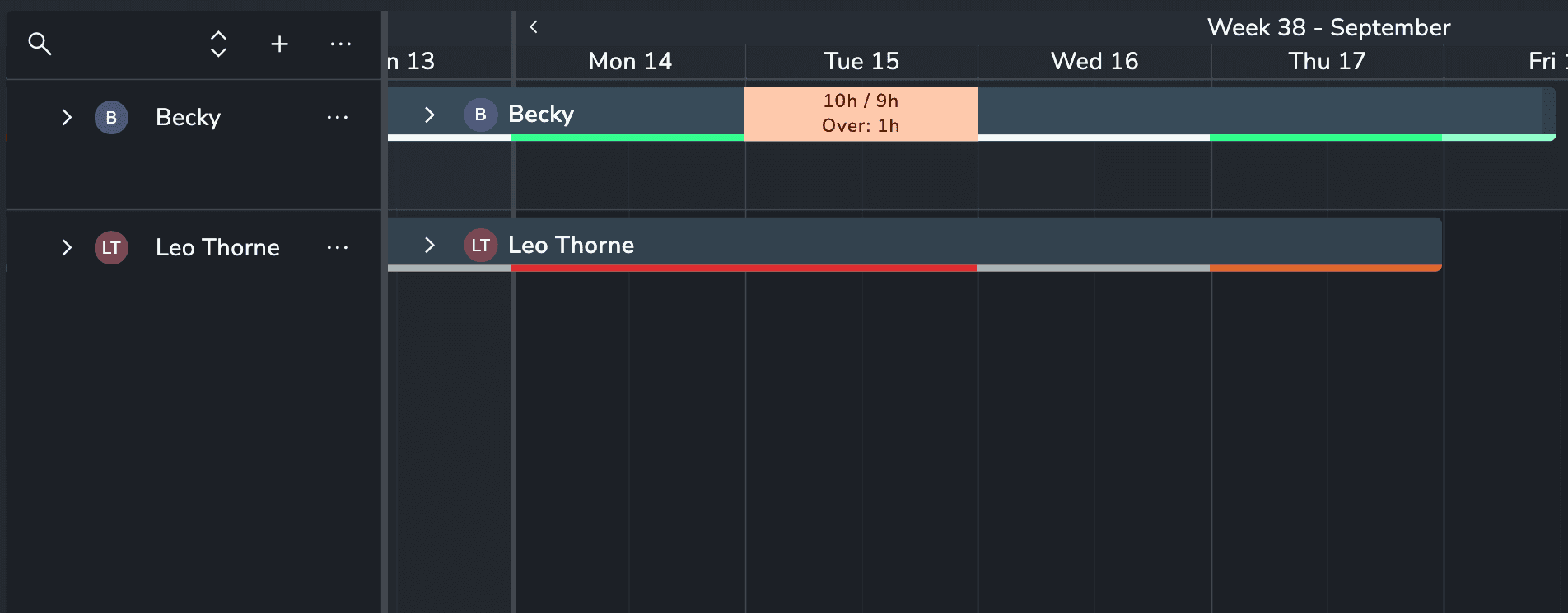
Instead of finding an overloaded artist by adding up bookings manually, or discovering the problem when work starts slipping, production gets an immediate visual warning while planning.
That makes workload useful at several levels. A coordinator can check whether another task will fit into someone’s day. A production manager can look across a team and see where work is becoming concentrated. A resource manager can identify people with room to take on additional work rather than relying on the apparent gaps between blocks on a timeline.
Because nobody really works the same eight-hour day
Resource planning gets messy because availability changes constantly.
Artists take time off. Freelancers join for short periods. Part-time staff have different working patterns. Meetings and other commitments take hours out of a day without necessarily changing the dates of the production work around them.
Planner now lets capacity reflect more of that reality.
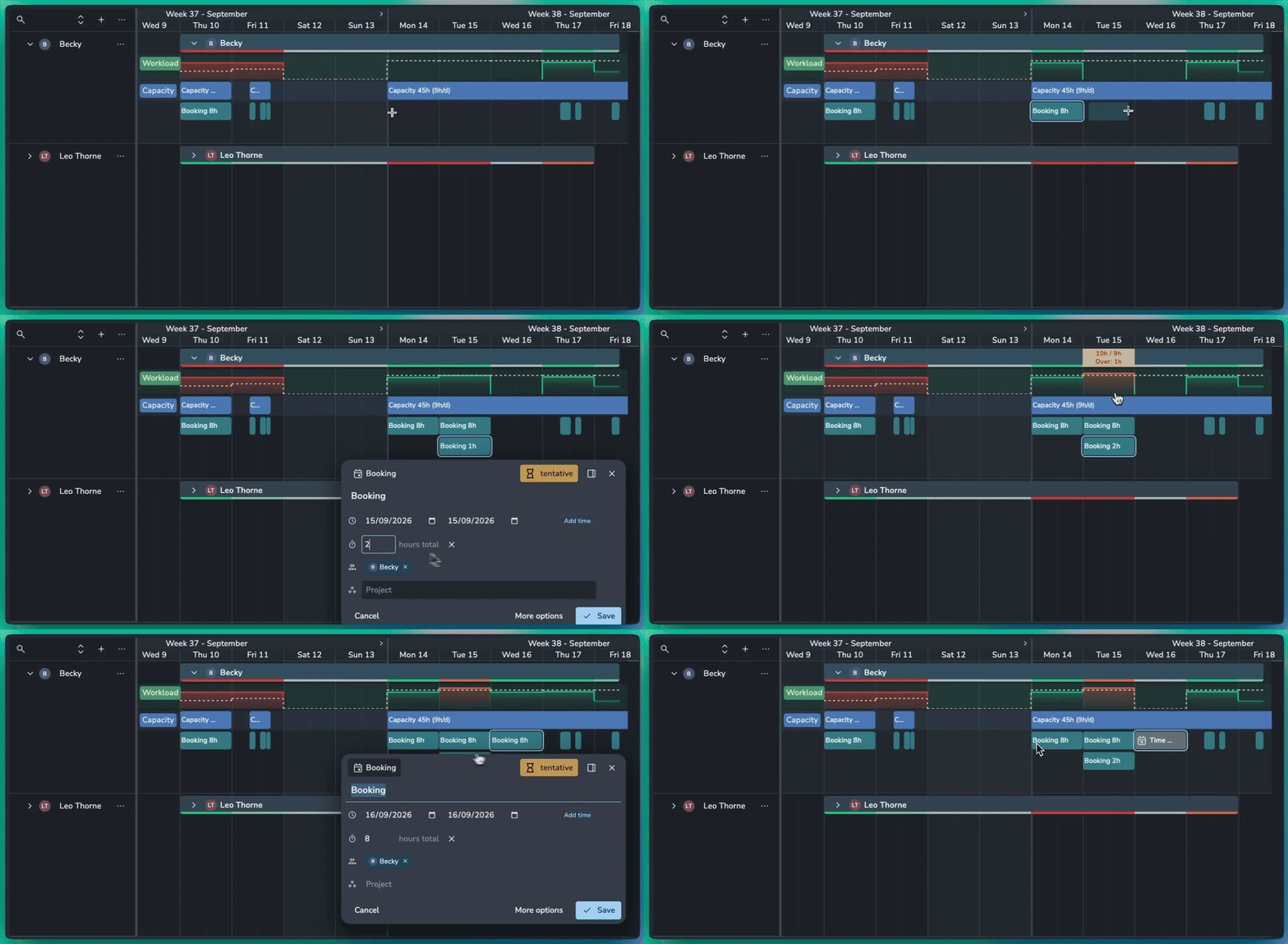
You can zoom into a day and define specific working hours, such as 9am to 5pm, then create bookings within those hours. If an artist is working a half day, their capacity can be reduced accordingly. If they’re unavailable altogether, marking an event as Time Off drops their capacity to zero for that period.
Any existing work booked during that time is immediately exposed as a conflict. It doesn’t matter if the artist normally has eight hours of capacity on every weekday; if Wednesday is marked as Time Off, Planner treats Wednesday as unavailable.
For production teams managing a mixture of permanent staff, part-time crew and freelancers, this gives the timeline a much more accurate view of the team they actually have available.
Catch the crunch before it becomes a fire drill
The most useful time to find an overbooked artist is while the plan can still be changed.
If a lighting artist has eight hours available but thirteen hours booked, production has options. Some work might move to another day. A task could be reassigned. The estimate might need revisiting. Extra capacity might need to be found.
Without that information, the schedule can look healthy while quietly depending on people doing more work than the available time allows.
Capacity also makes under-allocation easier to see. If someone has a full day available but only a small amount of work booked, their workload remains below the capacity line. That creates an opportunity to rebalance work rather than loading the next available task onto someone who is already full.
The goal isn’t to pack every hour of every day. It’s to give production enough information to make those decisions deliberately.
For the people playing production Tetris
Capacity and Workload are primarily aimed at the people responsible for turning a production plan into something the studio can actually deliver.
For Heads of Production and Producers, it gives a clearer view of whether the current plan fits the team available to deliver it. Production Managers and Resource Managers can compare demand across artists and make better-informed allocation decisions. Coordinators can see the impact of adding or moving work without manually reconciling bookings against availability. Leads and supervisors can also get a clearer picture of how much work is sitting with the people in their department.
It becomes especially useful as the team becomes less predictable. A small permanent crew supported by freelancers, overlapping projects, changing availability and time off can quickly make a simple booking calendar difficult to trust. Capacity gives those bookings the missing context.
From the big picture to actual human hours
Planner has been evolving to cover different levels of production planning inside AYON.
The Phase Planner gives teams a place to map high-level production phases and bookings before every individual task has been worked out. The Scheduler connects those plans to actual AYON tasks, dates and assignees. Capacity and Workload now add another dimension by showing whether the people assigned to that work have the time available to take it on.
That means a producer can move from looking at the broad shape of a production, through the tasks that need to happen, down to the workload sitting with an individual artist without having to interpret the same plan across disconnected views of the production.
Watch an overview of how capacity and workload planning works in AYON:
Planner 2.1.0 also includes several smaller improvements that make maintaining those plans faster. Capacity and bookings can be duplicated into following days or weeks, events can be moved forward without manually dragging them across the timeline, and existing bookings can be matched with capacity to give established plans a starting point.
A useful schedule shouldn’t only answer who is doing what, and when? It should help production answer can the team we have actually do the work we’ve planned?
With Capacity and Workload tracking, AYON Planner can now help answer both.